

Aller au contenu
View in the app

A better way to browse. Learn more.

Omerta

A full-screen app on your home screen with push notifications, badges and more.

To install this app on iOS and iPadOS
  1. Tap the Share icon in Safari
  2. Scroll the menu and tap Add to Home Screen.
  3. Tap Add in the top-right corner.
To install this app on Android
  1. Tap the 3-dot menu (⋮) in the top-right corner of the browser.
  2. Tap Add to Home screen or Install app.
  3. Confirm by tapping Install.

Kliroxx

Membre
  • Inscription

  • Dernière visite

Tout ce qui a été posté par Kliroxx

  1. intéressant ! thx
  2. Kliroxx a posté un sujet dans Questions et aides
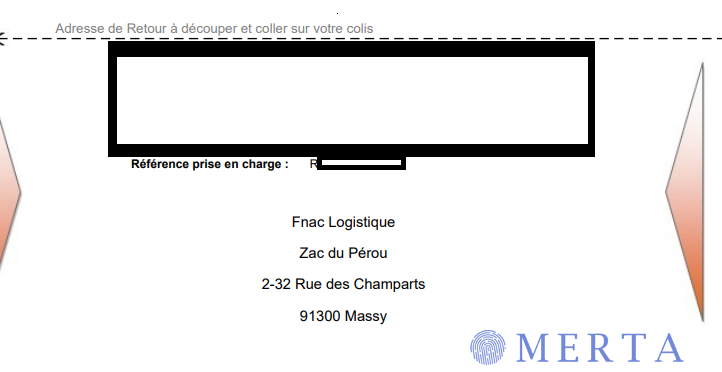
    Les frères j'ai un soucis avec le refund FNAC, ils m'ont envoyé un bon de retour pas comme les autres. (Regardez par vous même) J'ai une question : Comment prouver le dépôt du colis (Alors qu'il n'y a aucun encart dédié a la preuve sur le bon) ? Ou trouver le numéro de suivi ? Premier FTID vous vous en douterez !
  3. mangnifique le boss
  4. mangifique fo voir ca
  5. magnfique le boss
  6. magnfique le boss
  7. dsklferio n,felkznf kl,ze pokl,z ef
  8. regrvb ger ger gre
  9. vamos merci le boss
  10. vamos t'assure le boszs

Account

Navigation

Rechercher

Rechercher

Configure browser push notifications

Chrome (Android)
  1. Tap the lock icon next to the address bar.
  2. Tap Permissions → Notifications.
  3. Adjust your preference.
Chrome (Desktop)
  1. Click the padlock icon in the address bar.
  2. Select Site settings.
  3. Find Notifications and adjust your preference.