
Aller au contenu
View in the app

A better way to browse. Learn more.

Omerta

A full-screen app on your home screen with push notifications, badges and more.

To install this app on iOS and iPadOS
  1. Tap the Share icon in Safari
  2. Scroll the menu and tap Add to Home Screen.
  3. Tap Add in the top-right corner.
To install this app on Android
  1. Tap the 3-dot menu (⋮) in the top-right corner of the browser.
  2. Tap Add to Home screen or Install app.
  3. Confirm by tapping Install.

Tr4pstar

Membre
  • Inscription

  • Dernière visite

  1. je vais tester si elle marche encore
  2. merci frerot
  3. merci frreot
  4. Bv mon reuf je vais check
  5. Bienvu je vais le check (Edit ) Le lien est dead sert a rien de faire
  6. Tr4pstar a répondu à lolipop77 dans le sujet NSFW
    merci le s
  7. heee merci le s
  8. Tr4pstar a répondu à Raythume dans le sujet NSFW
    merci le s
  9. Tr4pstar a répondu à ZIp dans le sujet NSFW
    merci tu geres
  10. Tr4pstar a répondu à KPS dans le sujet NSFW
    merci frerot tu régales
  11. Tr4pstar a répondu à Wali-EE dans le sujet NSFW
    la pignouf max
  12. Tr4pstar a répondu à Wali-EE dans le sujet NSFW
    la pignouf max
  13. Tr4pstar a posté un sujet dans Configs
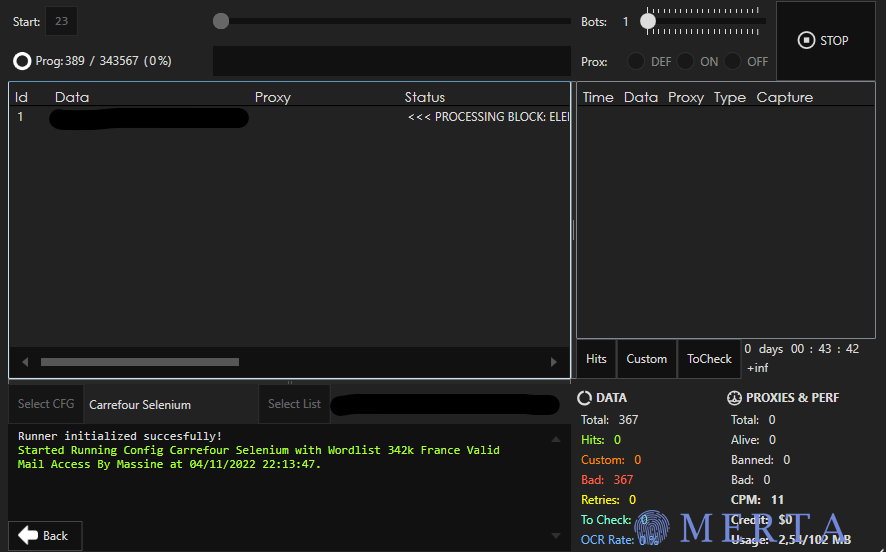
    Config Carrefour en selenium Bonjour tout le monde je vend une config carrefour en selenium. Elle atteint 11 de cpm par bot. Donc si vous avez un gros pc sa peut vite devenir un carnage. Elle capture le sold. Cette config est très rechercher et n'est pas réalisable ou trouvable facilement. Si vous voulez plus d'information ou me l'acheter sa ce passe sois sur Discord Leakers#8509 ou sur Telegam @Trapstar_Uhq
  14. bc sale putain de bg

Account

Navigation

Rechercher

Rechercher

Configure browser push notifications

Chrome (Android)
  1. Tap the lock icon next to the address bar.
  2. Tap Permissions → Notifications.
  3. Adjust your preference.
Chrome (Desktop)
  1. Click the padlock icon in the address bar.
  2. Select Site settings.
  3. Find Notifications and adjust your preference.