

Aller au contenu
View in the app

A better way to browse. Learn more.

Omerta

A full-screen app on your home screen with push notifications, badges and more.

To install this app on iOS and iPadOS
  1. Tap the Share icon in Safari
  2. Scroll the menu and tap Add to Home Screen.
  3. Tap Add in the top-right corner.
To install this app on Android
  1. Tap the 3-dot menu (⋮) in the top-right corner of the browser.
  2. Tap Add to Home screen or Install app.
  3. Confirm by tapping Install.

Fluffycutie

Membre
  • Inscription

  • Dernière visite

Tout ce qui a été posté par Fluffycutie

  1. Sympa ça j’me demande s’ils ont aussi mis des easter eggs
  2. cool, ça va atténuer ma paranoïa
  3. Merci bro tu gères grave ( les techniques de ce genre c’est valide/actuel pour tj?) edit: jconnaissais deja la video mais elle traînait dans “a regarder plus tard” bon lets go
  4. Fluffycutie a répondu à KING dans le sujet Social engineering
    La manipulation à son apogée whoop whoop
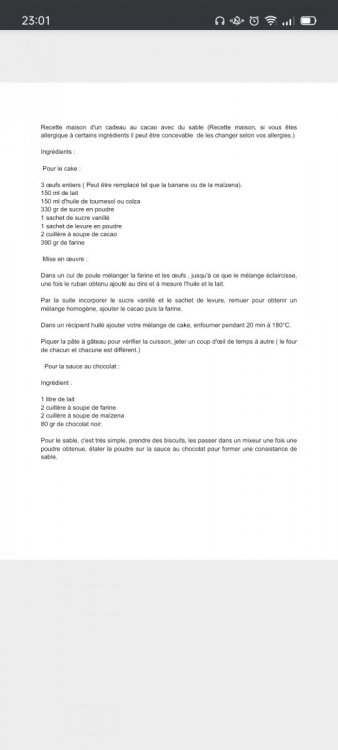
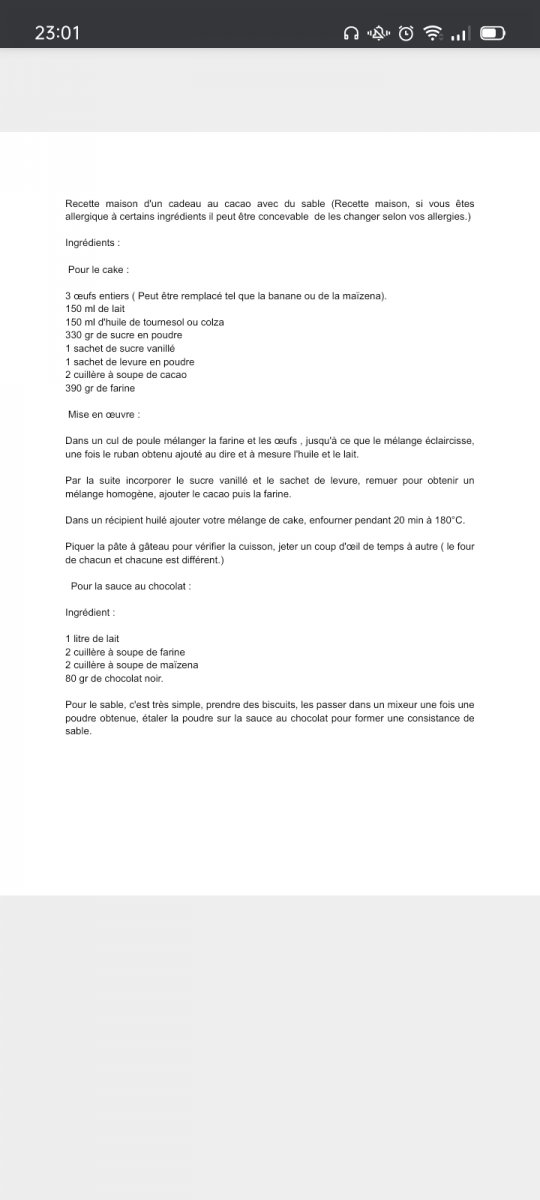
  5. [Hide] [/Hide] Voici comment faire un gâteau au sable.
  6. Putain je suis chaud patate moi mdrrrr
  7. un poste dans un thread a répondu à Fluffycutie dans Tutoriels / Ebooks
    Marina passe et tu t'ecartes Marina domine et tu t'inclines...
Account

Navigation

Rechercher

Rechercher

Configure browser push notifications

Chrome (Android)
  1. Tap the lock icon next to the address bar.
  2. Tap Permissions → Notifications.
  3. Adjust your preference.
Chrome (Desktop)
  1. Click the padlock icon in the address bar.
  2. Select Site settings.
  3. Find Notifications and adjust your preference.